Read it, or listen to it.
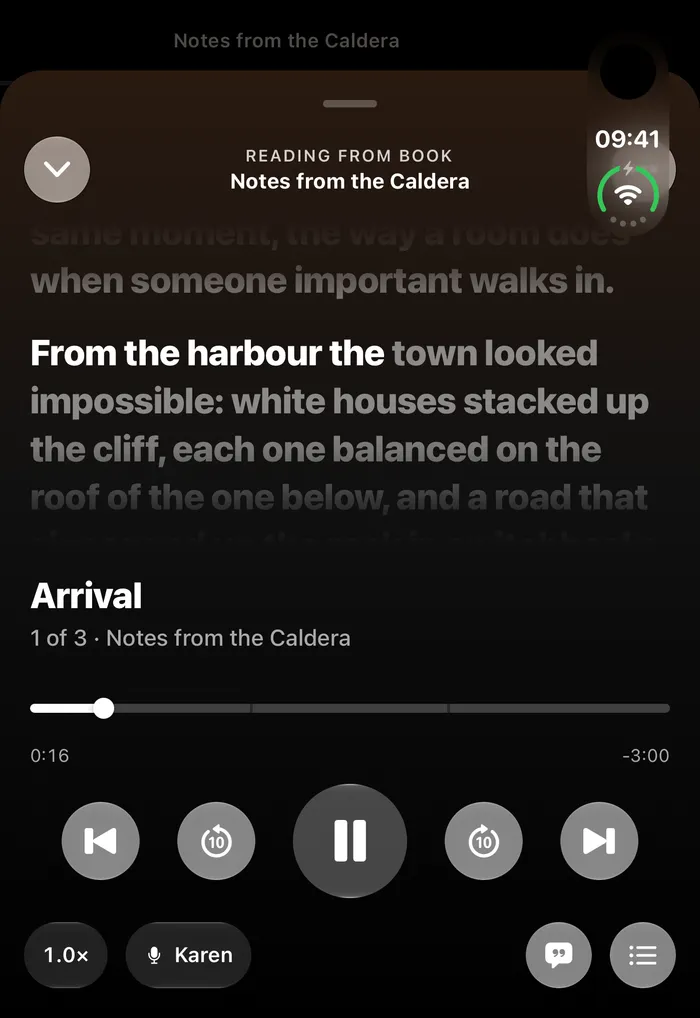
Import an ebook or PDF and read it inside Nemos. When your eyes need a rest, press play and it reads to you, following along word by word.

How it works
A real reader
Change the text size and theme, use Focus Mode, or keep your place with the Reading Ruler. Search inside the book from the same screen.
Read aloud
Press play and the current sentence lights up as it is read. Change the speed, pick a voice and jump between chapters.
Keeps going
Leave the book and the mini player stays with you, so you can keep listening while you use the rest of the app.
People use it for
- A long PDF on a walk
- A book before bed
- A chapter while you cook
Good to know
Read aloud uses the voices on your device, and the built-in ones can sound basic. You can download a more natural voice in iOS Settings. Books protected by DRM may not open.